AI Agents for Business Automation: A Practical Guide for SMBs
Published on June 10, 2026
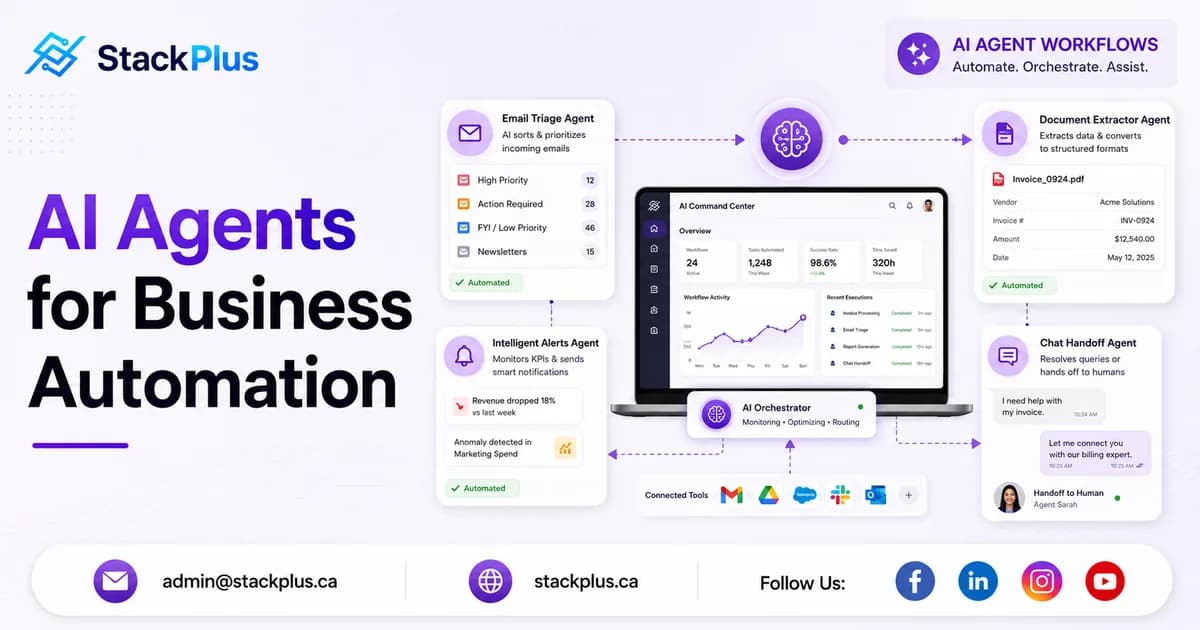
AI agents are one of the most talked-about topics in software right now, and for good reason. When designed well, they can triage support requests, extract data from documents, trigger workflows, summarize information, and reduce the manual load on small teams. When designed poorly, they create confusion, bad outputs, and another layer of tools nobody trusts.
For SMBs and growing companies, the opportunity is not to replace your team with autonomous bots. It is to automate repetitive work so people can focus on judgment, relationships, and growth. At StackPlus, we help businesses build practical AI automation into web apps, internal tools, and customer-facing products where the workflow is clear and the ROI is measurable.
Table of Contents
What is an AI agent in a business context
In simple terms, an AI agent is a software component that can take a goal, use tools or data sources, and complete steps toward an outcome. That might mean reading an inbound email, classifying the request, pulling customer history from a CRM, drafting a response, and handing the final action to a human for approval.
Agents are most useful when work follows a pattern: intake, decision, action, review. They are not magic. They still need guardrails, permissions, logging, and human oversight, especially in regulated or customer-facing environments.
Where AI agents create the most value
The best automation opportunities are repetitive, time-consuming, and low-risk enough to support human review. Common examples we see across industries include:
- Support triage: classify tickets, suggest replies, and route issues to the right team
- Document processing: extract fields from invoices, forms, intake notes, or contracts
- Sales ops: summarize lead activity, enrich records, and draft follow-up messages
- Operations: monitor exceptions, trigger alerts, and prepare daily status reports
- Internal knowledge: answer employee questions from SOPs, wikis, and policy documents
In logistics, agents can flag delivery exceptions. In healthcare, they can prep patient intake summaries for staff review. In fintech, they can assist with document checks and compliance workflows. The pattern is the same: automate preparation, keep humans accountable for final decisions.
Agents vs traditional automation
Traditional automation follows fixed rules. If A happens, do B. That works well for stable processes with predictable inputs. AI agents add flexibility when inputs are messy: unstructured emails, PDFs, chat messages, images, or mixed data formats.
The smart approach is often hybrid. Use rules for the parts that never change. Use agents where language understanding, classification, or summarization adds value. Then connect both into the systems your team already uses.
A practical rollout plan for SMBs
The fastest path to useful agent automation is not a company-wide AI initiative. It is one workflow, one measurable outcome, and one clear owner.
- Step 1: Pick one workflow with visible pain, such as manual ticket sorting or report prep
- Step 2: Define success metrics like hours saved, response time, or error reduction
- Step 3: Map the data sources and tools the agent can access
- Step 4: Launch with human approval on every output
- Step 5: Review failures weekly and tighten prompts, permissions, or fallback rules
- Step 6: Expand only after the first workflow proves reliable
Most SMBs can validate a first agent workflow in a few weeks when scope stays focused. That is far better than spending months building a broad AI platform nobody adopts.
Design guardrails before scaling
Trust is the product. If users do not understand what the agent did or cannot correct it quickly, adoption will stall. Every agent workflow should include logging, permission boundaries, and a clear escalation path to a person.
- Limit access to only the systems and data the agent truly needs
- Show sources or reasoning when answers come from internal documents
- Require approval before external messages or financial actions are sent
- Track failure cases and build a review queue for edge scenarios
- Define when the agent must stop and hand off to a human
Common mistakes to avoid
Many automation projects fail for predictable reasons. Teams automate the wrong workflow, skip integration with existing tools, or launch without a review step because demo outputs look impressive.
- Starting with a vague goal like "use AI everywhere" instead of one workflow
- Connecting agents to too much data without role-based controls
- Measuring activity instead of business outcomes
- Treating agent output as final without human review in high-stakes tasks
- Building standalone chat experiences instead of embedding automation into existing software
How StackPlus builds AI agents that teams actually use
We design AI agents as part of real products and internal systems, not disconnected experiments. That means integrating with your CRM, dashboard, mobile app, database, or custom workflow tool so automation fits the way your business already operates.
Our work spans LLM-powered assistants, document extraction, workflow orchestration, predictive features, and production-ready integrations with platforms like OpenAI, cloud services, and modern web stacks. The goal is always the same: reduce manual work, improve response time, and give your team software they trust.
If you are exploring AI agents or business automation, start with the task your team repeats every day and wishes they did not. Book a consultation with StackPlus and we will help you identify the highest-ROI workflow and define a build plan that is safe, useful, and ready for production.
Are you planning an AI-powered MVP?
StackPlus helps startups and growing businesses scope, design, and ship production-ready software with the right AI foundation from day one.